What is DNS?
- Domain Name System (DNS) is a collection of databases that translates uniform resource locators (URLs) to IP addresses.
- Whenever you are typing www.google.com (URL) in your browser, it is translated to an IP address like
216.58.196.206using DNS servers. - Just imagine, how difficult would it have been to navigate the Internet without DNS and URL system. We’d have to remember number like
216.58.196.206or even better have a phonebook kinda thing.
How it works?
- As soon as you enter the URL, browser sends the request to nearest DNS server which maintains the mapping of URL and IP addresses.
- DNS server responds with the IP address it has available for the given URL.
- Your browser sends a request to the servers IP address now with all the required info.
- Server responds with the data or view requested by your browser.
- Your browser renders it and shows you the pretty webpage.
DNS Records
- ICANN is a global nonprofit tasked with managing internet namespaces and numbers. ICANN and IANA authorise domain name registrars like GoDaddy, namecheap, etc. These registrars manage the reservation of domain names. If I want to host shivamx96.xyz, I’ll go to one of these registrars and ask them to reserve the domain name for me. As soon as I buy the domain, I’m assigned a name server by my domain registrar. This name server manages my DNS records
- How does DNS server store the information linking an URL to IP address?
- DNS records are database entries to map URL and IP address. When a computer requests my domain shivamx96.xyz, the DNS request arrives to my name server, and it checks DNS records to give it the correct IP address.
- Owing to different kinds of application that the Internet facilitates, there are multiple times of DNS records:
- Name server (NS) record stores the path to my name server; name server is the one that manages DNS.
- Mail exchange (MX) record stores the path to my mail server; if anyone is sending any mail to {anything}@shivamx96.xyz, the DNS will guide the mail to be sent to mail server, and then it’s the mail server’s job to process it with the policy defined for the domain.
- Address (A) record stores the IP address of server to be used for serving HTTP traffic on IPv4. IPv6 equivalent for this AAAA.
- Canonical name (CNAME) record typically used to set alias to go look for another name. eg. I want users from shivamshekhar.com to redirect to shivamx96.xyz, i’ll send a CNAME record at shivamshekhar.com to move to shivamx96.xyz.
- Text (TXT) records allow inserting arbitrary text into DNS records.
- There are several more types, but these are common ones.
Deep dive into DNS resolution
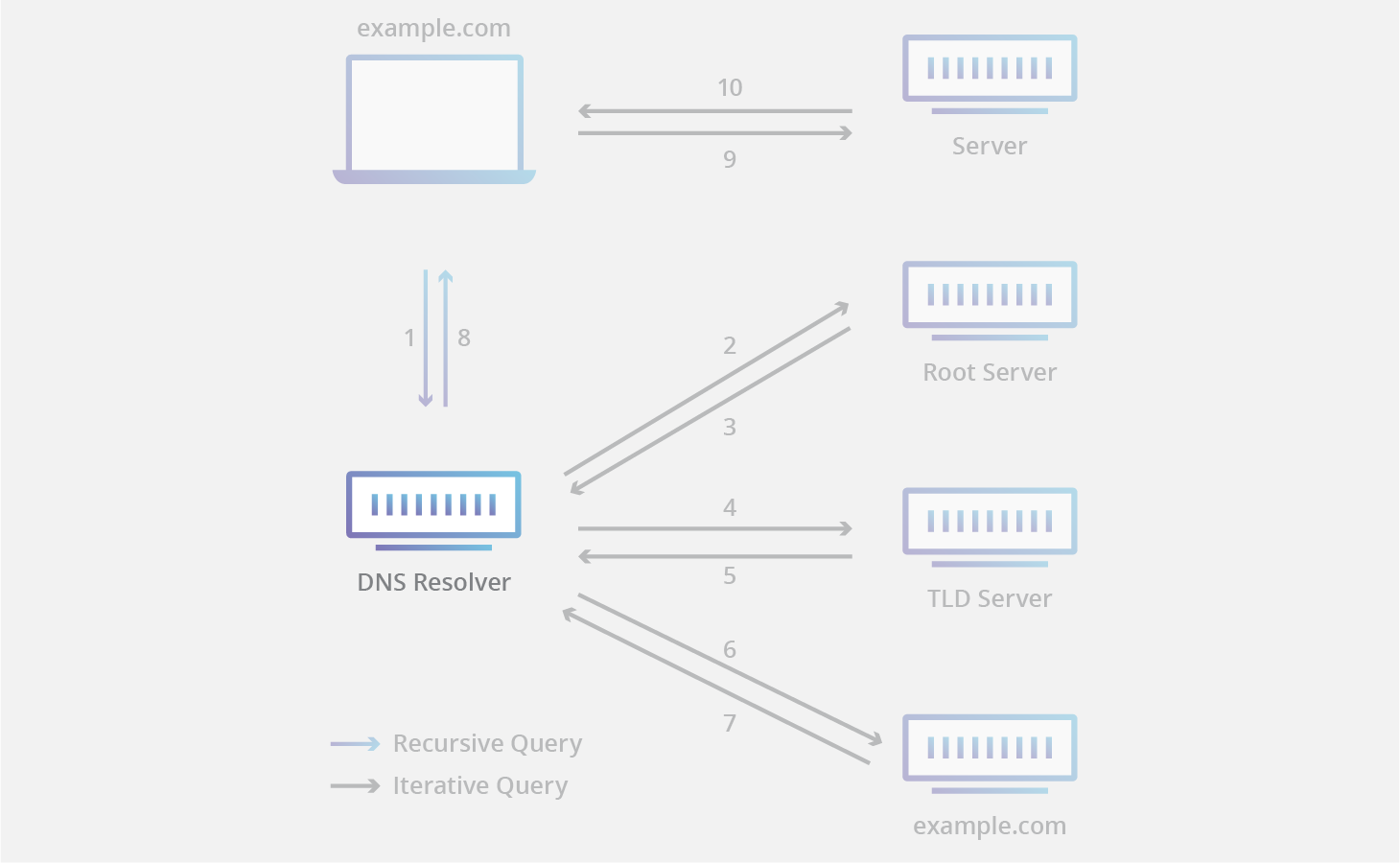
Diving further into Step 2 of the above flow.
- Our request goes to DNS resolver, this is typically our ISP or other public DNS resolver configured by us (examples are Cloudflare, OpenDNS, Google). It tries to find the IP address of requested URL with respect to the protocol requested (eg. HTTP to shivamx96.xyz will try finding A/CNAME record from).
- DNS resolver typically maintains a cache of frequently accessed domain mappings. Let’s say- if you ask for HTTP google.com, then most probably it’ll pick the data from cache and send it to you.
- If not available in cache, it hits one of the root servers (there are only 13 of theses). Root server responds with address of a TLD server.
- TLD servers maintains information for all domains that end with a common extensions eg. .in or .com. These are managed by IANA. TLD servers responds with address of a authoritative nameserver.
- Authoritative nameserver contains information specific to a domain it serves, and is ultimate authority for DNS resolution pertaining to that domain and hence the name.
Risks in DNS
- DNS has a lot of issues from security aspect. It was never designed to be secure from the get go, and security features have been introduced later on. Being a well established protocol only used for DNS resolutions, DNS packets are less monitored for malicious activity and hence they are a useful tool for attackers.
- As described earlier, DNS resolvers maintain a cache at their end with all of the recently made DNS queries and their responses. An attacker poison cache of that DNS resolver with wrong entries, i.e. you’ll be sent to a wrong IP address for the site, the implications are huge in case of banking and financial usages. These kinds of attacks are cache poisoning/DNS spoofing.
- There are multiple other kinds of attacks as well. Briefly describing two others:
- DNS tunneling is when attacker passes malicious information in DNS queries and responses by tunneling through SSH/TCP bypassing the firewall.
- DNS hijacking is when attacker redirects DNS queries to a different DNS server.
Securing DNS
- DNSSEC (DNS security extensions) is the primary security protocol for securingg DNS transmissions. At it’s core, it is a hierarchical digital signing policy percolated across all the layers of DNS.
- ICANN signs a key for root servers. A root DNS server signs keys for respective TLD nameservers (like .xyz nameserver). And each TLD nameservers signs keys for specific domains (like shivamx96.xyz).
- The chain of signing starts from root DNS server. The root DNS server is validated in a widely publicised event called Root Zone Signing Ceremony. These ceremony turns root DNS server into a trust anchor.
- It’s a very human side of securing the Internet: the reason you can trust the root DNS servers is because you can trust the people signing it. And, the reason you can trust the people signing it is because of the strict protocols they follow while doing so. That’s what the Root Signing Ceremony is all about. (Quoted from CloudFlare website).